Your Credentials Are Probably Out There
Here's the uncomfortable truth: if you've been online for more than five years and used the same email across multiple services, your credentials have almost certainly appeared in a data breach. Not maybe. Probably.
Billions of credential records are traded on criminal forums, indexed in aggregated databases, and tested in automated credential stuffing attacks. The question isn't "have I been breached?" — it's "which breach, and what was exposed?"
This lesson shows you how to find out.
HaveIBeenPwned (HIBP) is a free service built by security researcher Troy Hunt that aggregates data from known public breaches. It indexes over 14 billion compromised accounts. It does not store your passwords — only cryptographic hashes used for comparison.
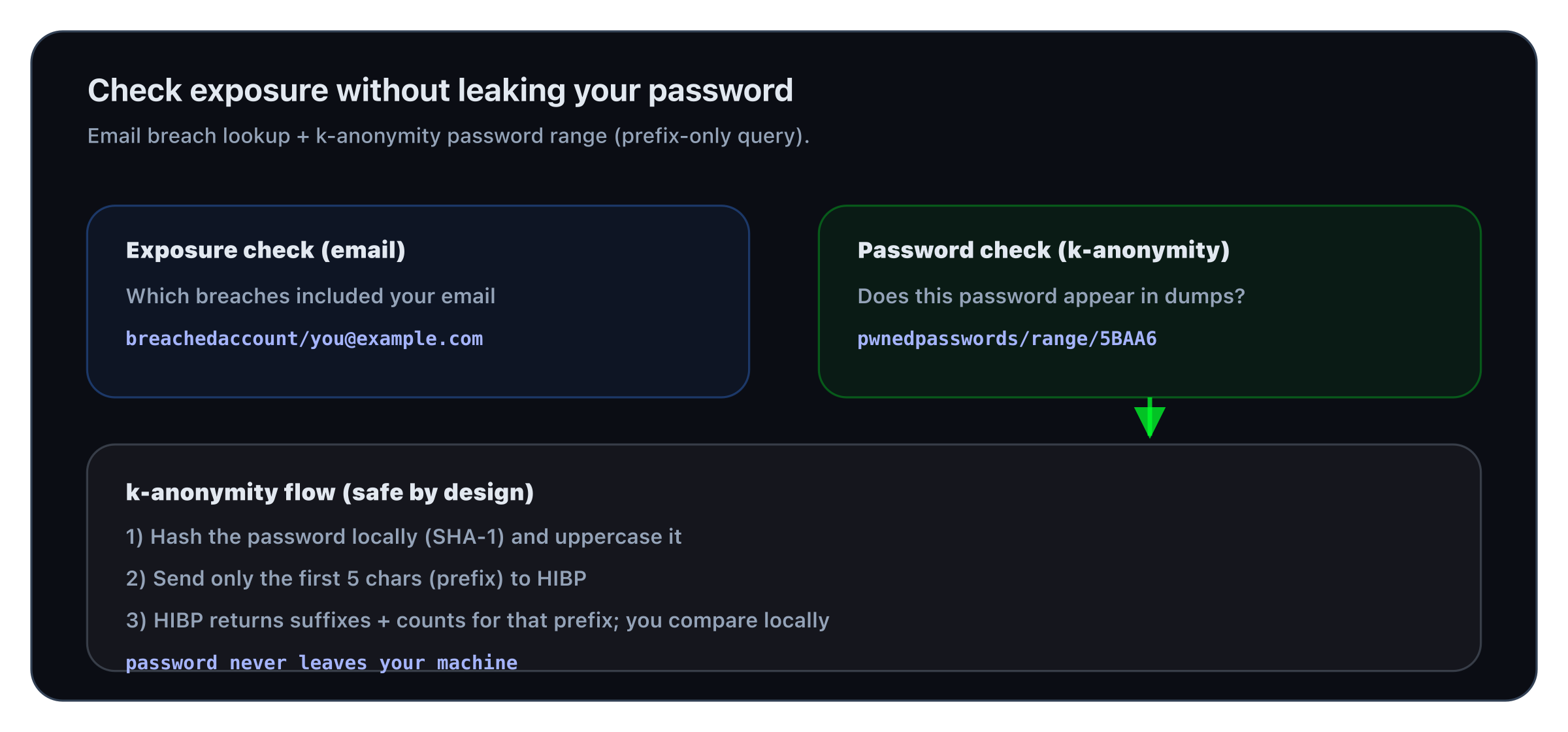
Email lookup tells you which breaches you’re in; the password range API lets you check a password without sending it.
Step 1 — Check Your Email Address
The simplest check: visit haveibeenpwned.com and enter your email address.
For a scriptable approach:
curl -s https://haveibeenpwned.com/api/v3/breachedaccount/you@example.com -H 'hibp-api-key: YOUR_KEY' | python3 -m json.tool | grep -E 'Name|BreachDate|DataClasses'What the data classes mean:
| Data class | Risk level | What attackers can do |
|---|---|---|
| Email addresses | Low alone | Phishing, spam |
| Passwords (hashed) | High | Crack offline, then credential stuff |
| Passwords (plaintext) | Critical | Direct account takeover |
| Phone numbers | Medium | SIM swap, SMS phishing |
| Physical addresses | Medium | Doxing, physical targeting |
| Credit card data | Critical | Financial fraud |
| Security questions | High | Account recovery bypass |
Step 2 — Check a Password Without Sending It
You can check if a specific password has appeared in known breaches — without ever sending the password to any server.
HIBP uses a k-anonymity model:
- Hash your password with SHA-1
- Send only the first 5 characters of the hash to the API
- The API returns all hashes that start with those 5 characters
- You check locally if your full hash is in the list
Your full password never leaves your machine.
# Step 1: Hash the password
echo -n "YourPasswordHere" | sha1sum | tr '[:lower:]' '[:upper:]'# Step 2: Send only the first 5 chars (5BAA6) to the API
curl -s https://api.pwnedpasswords.com/range/5BAA6 | grep "1E4C9B93F3F0682250B6CF8331B7EE68FD8"The number after the colon (3,730,471) is how many times this password has appeared in breaches. If the output is non-empty, the password is compromised.
One-liner script:
python3 -c "
import hashlib, urllib.request
pw = 'YourPasswordHere'
h = hashlib.sha1(pw.encode()).hexdigest().upper()
prefix, suffix = h[:5], h[5:]
url = f'https://api.pwnedpasswords.com/range/{prefix}'
data = urllib.request.urlopen(url).read().decode()
match = [l for l in data.splitlines() if l.split(':')[0] == suffix]
print(f'Found {match[0].split(chr(58))[1]} times' if match else 'Not found in breaches')
"Step 3 — Check Multiple Emails at Scale
If you manage a team or want to check a list of email addresses (with their consent), HIBP offers a domain-level search:
curl -s "https://haveibeenpwned.com/api/v3/breacheddomain/yourcompany.com" \\
-H "hibp-api-key: YOUR_KEY"The /breacheddomain endpoint requires a paid HIBP API key. Individual email lookups are free with a key. Password range lookups are always free and anonymous.
Step 4 — Understand What Credential Stuffing Means for You
When your email + password pair appears in a breach, attackers run it through an automated tool called a credential stuffer — testing it against hundreds of sites simultaneously.
The automation:
- Tools like Snipr, Openbullet, or STORM try your credentials on Netflix, Amazon, banks, email providers
- Success rate on large breach dumps: typically 0.1–2% of accounts successfully log in somewhere
- The window between a breach being posted and credential stuffing starting: hours, sometimes minutes
Why this matters even if you changed your password:
- If you reused the same password on other sites, those accounts are still at risk
- If an attacker logged in before you changed the password, they may have already set up access (OAuth app grants, forwarding rules, backup email changes)
What to Do When You Find a Breach
- Change the password on that service immediately if you haven't already
- Search for reuse: did you use that same password anywhere else? Change it everywhere
- Check for damage: login history, active sessions, connected apps, email forwarding rules
- Enable 2FA on the breached service if available
- Check for secondary effects: did attackers use the account to reset passwords on other services?
In the next lesson, you'll understand exactly what happens to your password after a breach — how it's stored, cracked, and traded.