The Threat in Your Room
You're in an Airbnb, a hotel, or a rental office. You connect to the Wi-Fi. You trust the space. But you shouldn't trust the network.
A hidden camera doesn't need a separate data plan. It just needs the Wi-Fi. Once it's connected, anyone with the password can watch a live feed from anywhere in the world. This isn't movie plot stuff — it's a cheap, common threat.
This lesson gives you the power to see every single device connected to the network and flag the ones that shouldn't be there.
Only scan networks you have permission to use (your rental, your home). Scanning networks you're not authorized to access is illegal. This is for defensive purposes only.
Step 1 — Find Your Network's Range
First, find your own IP address. This tells you what "neighborhood" of the network you're in.
The /24 means we're scanning all 256 possible addresses on your local
network.
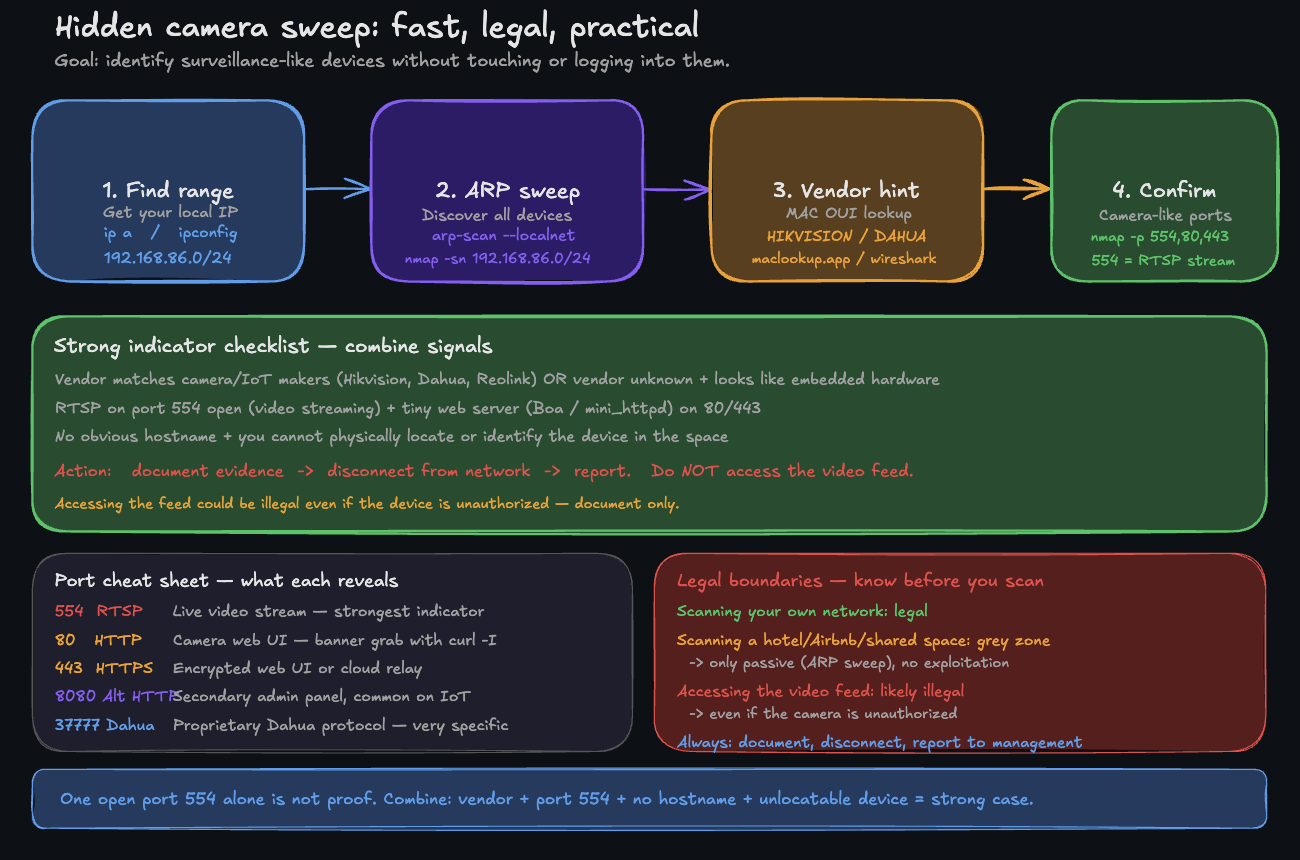
A simple workflow: range → sweep → vendor hint → confirm ports (no touching the device).
Step 2 — The Ultimate Network Sweep
This is the core command. We'll use arp-scan, a tool that's often faster and more reliable for discovering devices on your local subnet than a simple ping sweep. It talks directly to devices at a low level.
Look at that output. You see the IP, the MAC address, and — most importantly — the vendor.
That second line? HIKVISION DIGITAL TECHNOLOGY? Hikvision is one of the world's largest manufacturers of IP cameras. If you don't see a Hikvision camera in the room, you have a problem.
Step 3 — The "Is This a Camera?" Checklist
You have a list of devices. Now, how do you spot a camera? Look for these red flags:
Suspicious vendor names:
HIKVISION,DAHUA,REOLINK,AMCREST,EZVIZ,ANNKEEspressif Systems(common in cheap, unbranded IoT devices)ShenZhenorShanghaiin the vendor name (often generic IoT)Unknown vendor
Manual MAC address lookup: If arp-scan shows "Unknown vendor", copy the first 6 characters of the MAC (the OUI) and paste them into macvendors.com.
Step 4 — Confirm Your Suspicions
You've found a suspicious device. Now let's see if it's acting like a camera. We'll use nmap to check for the tell-tale sign: the RTSP video streaming port.
Port 554 means it's running the Real Time Streaming Protocol — how cameras broadcast video.
Boa httpd is a tiny web server found almost exclusively in embedded devices like IP cameras.
Seeing both port 554 open and a camera vendor name is as close to a smoking gun as you can get without touching the device.
- Document: Take a screenshot of your terminal window. 2. Disconnect: Leave the Wi-Fi network immediately. 3. Report: Contact the platform (Airbnb, Booking.com, etc.) with your evidence. They take this extremely seriously. 4. Do Not Access: Do not try to log in or view the feed. That crosses a legal line.
Summary
You now have the power to:
- Instantly map every device on any network you join
- Identify manufacturers from hardware addresses
- Spot the digital fingerprints of surveillance equipment
This is a critical skill for digital privacy. But finding the device is only the beginning.
In the next lesson, you'll learn to go deeper — moving from just finding devices to profiling them. You'll identify their operating system, every service they're running, and build a complete intelligence report on your network. This is the difference between a simple scan and a professional network audit.