The 60-Second Reality Check
If I know one thing about you, I can often find ten.
Not because I'm hacking. Because the internet keeps receipts: profiles, posts, photos, documents, reviews, old usernames, cached pages, and public records.
OSINT (Open Source Intelligence) is the skill of turning those receipts into usable intelligence.
A Scenario You’ve Probably Seen
You get a message:
- “Hey, it’s me. New number. Can you send that file again?”
- “Your account has unusual activity. Confirm your details.”
- “We’re hiring. Quick call today?”
The sender looks legitimate:
- right name
- right profile picture
- right company branding
OSINT is how you answer the defensive question:
Is this real, or is this a constructed identity?
Not with gut feeling. With a structured investigation.
OSINT uses public information, but that does not make everything ethical. This course is for defensive security: awareness, investigation, and privacy. Do not stalk, harass, threaten, dox, or target individuals.
What OSINT Is (and Isn’t)
OSINT is:
- Finding public information across the open web, social platforms, and public datasets
- Validating whether a claim is true
- Correlating multiple weak signals into a stronger conclusion
- Documenting your steps so someone else can reproduce your reasoning
OSINT is not:
- Breaking into accounts
- Using malware, exploits, or credential theft
- “Guessing” with no evidence
- Copying random screenshots from a forum and calling it proof
OSINT in One Model: Connectors and Pivots
Think of OSINT as a graph:
- A connector is an identifier that links things together (username, email, photo, link).
- A pivot is using a connector to find new sources.
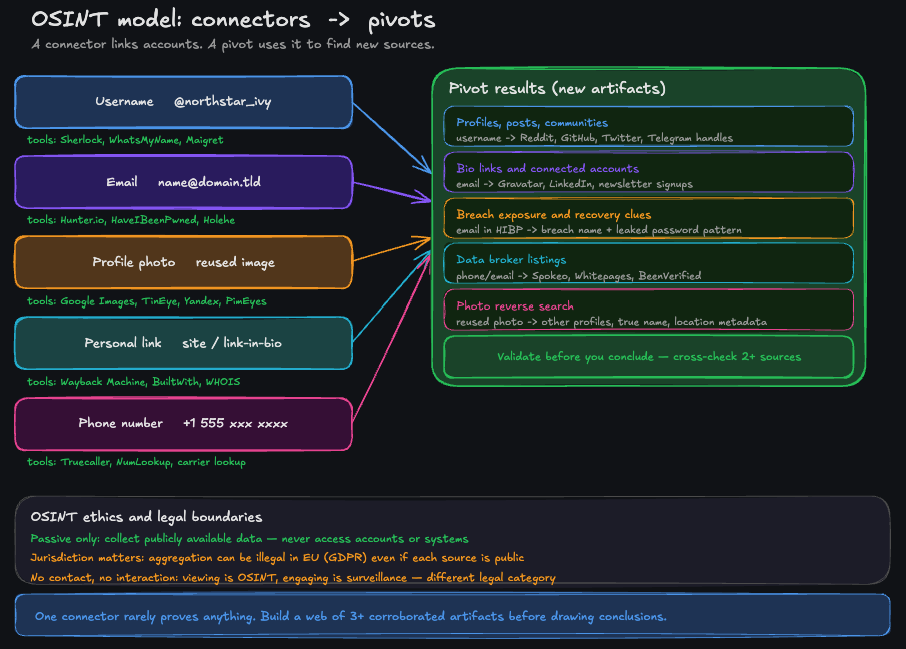
Connectors link accounts. Pivots use connectors to find new sources. Validate before you conclude.
| Connector | Why it links | Typical pivots |
|---|---|---|
| Username | Reused across sites | Profiles, posts, communities, linked accounts |
| Used for login and contact | Exposure, linkability, recovery risk | |
| Profile photo | Reused or reposted | Other accounts, stolen identities, impersonation |
| Personal link (site/Link-in-bio) | Central hub | Everything the person chose to connect |
| Phone number | High identity value | Data brokers, public listings, takeover risk |
The skill is not “finding a thing”. It’s choosing the right connector and pivoting safely.
Where OSINT Shows Up in the Real World
OSINT isn’t niche. It’s a daily tool in many jobs.
| Role | OSINT use case | What they look for |
|---|---|---|
| SOC / security team | Investigate phishing and impersonation | Patterns and reused assets |
| Journalist / researcher | Verify claims and identities | Independent confirmation, timelines |
| Recruiter / HR | Validate a public profile | Consistency, red flags, false claims |
| Fraud team | Detect fake accounts | Reused photos, linked identities, automation cues |
| Privacy-conscious individuals | Reduce exposure | Connectors that enable mapping or takeover |
Why OSINT Is So Powerful
OSINT works because humans are consistent. We repeat:
- usernames
- profile photos
- writing style
- link patterns (same personal site, same portfolio, same “link-in-bio”)
- communities (same niche interests across platforms)
- habits (posting times, locations, events)
And platforms are designed to maximize sharing, not privacy.
A Mini Case Study (Fictional, but Realistic)
Goal: Verify whether two profiles are the same person.
You have only three clues:
- a username:
northstar_ivy - a profile photo
- a single link in a bio
What beginners do:
- stop at “the names match”
- assume the first result is correct
What OSINT does instead:
- Collect: find candidate accounts that match the username or photo
- Verify: check independent signals (history, links, communities)
- Pivot: use the verified link as the hub to discover connected accounts
- Conclude: state confidence (low/medium/high) and why
This is the difference between “searching” and “investigating”.
The Two OSINT Rules That Prevent Most Mistakes
-
Separate collection from conclusions. Collect first, then decide what it means.
-
Never upgrade a guess into a fact. If you can’t reproduce it and cross-check it, keep it as a hypothesis.
The OSINT Mindset: Clues, Not Certainty
Beginners try to “find the answer”. Professionals try to test hypotheses.
You’ll learn to ask:
- What am I trying to prove or disprove?
- What would a false positive look like?
- What independent sources confirm this?
- What is the confidence level: low, medium, high?
OSINT is more like investigative journalism than “hacking”.
What You’ll Learn Next (and Why It’s Worth Continuing)
If you continue the course, you’ll move from concepts to real OSINT skills:
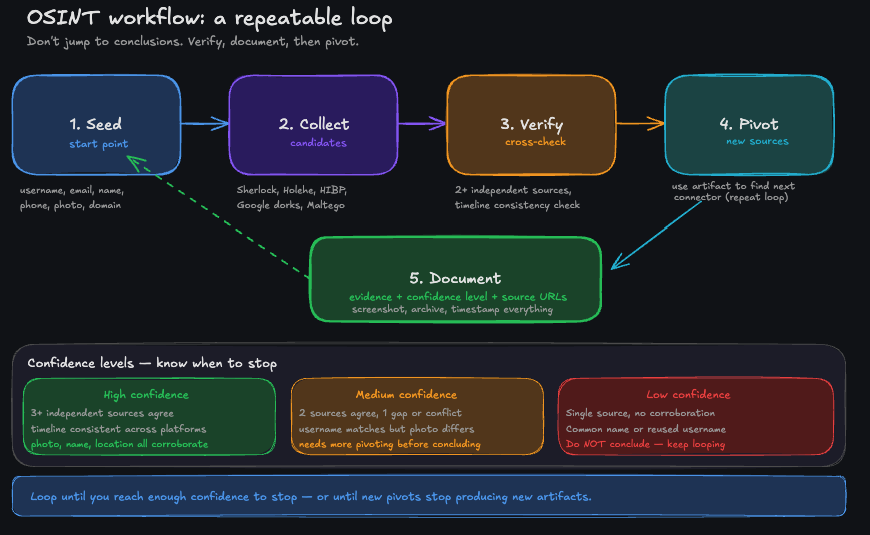
A repeatable workflow beats random searching: seed, collect, verify, pivot, document.
| Lesson | What you gain | Why it matters defensively |
|---|---|---|
| Digital footprint | See your footprint as a graph | You’ll understand your own easy pivots |
| Investigation workflow | Collect → verify → pivot → document | You’ll stop getting fooled by weak signals |
| Username investigation | Link and verify accounts safely | You’ll spot impersonation and reduce linkability |
| Email investigation | Understand exposure and recovery risk | You’ll harden the account takeover pathway |
| Image investigation | Detect reused assets and context leaks | You’ll identify catfishing and avoid oversharing |
| Protecting yourself (Module 2) | Cleanup and separation plan | You’ll stop being an easy OSINT target |
Module 1 teaches you to investigate. Module 2 teaches you to stop being an easy target. Most OSINT content online covers the first half and ignores the defense.
Tools You’ll Hear About (Optional, Practical)
This course stays focused on methodology, but you’ll see practical options in Module 2:
- Email privacy + aliases: SimpleLogin, Firefox Relay, iCloud Hide My Email, Proton Pass aliases
- Privacy-focused email providers: Proton Mail (among others)
- Data broker removals: services like Incogni (and alternatives), plus manual opt-outs
You don’t need to buy tools to learn OSINT. But tools can make defense easier once you know what to fix.
A Practical Rule You’ll Use All Course
Never trust a single signal.
Any one clue can be wrong:
- shared usernames
- recycled avatars
- fake bios
- copy-pasted content
Your job is to build a case from multiple independent signals.
What You’ll Be Able to Do After This Course
By the end, you’ll be able to:
- run a structured OSINT investigation without getting lost
- pivot from a username/email/image safely and defensibly
- spot false positives and avoid “OSINT hallucinations”
- understand what your own footprint reveals
- execute a realistic plan to reduce your exposure
Flashcards
What does OSINT stand for?